
Located in the Other Reports screen, the System Checkup report shows Resources or Resource Types that are assigned to Resource Types at a different Organization.
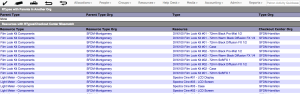
System Checkup
Resources belong to a Checkout Center. Checkout Centers are assigned to an Organization. Furthermore, Resources are assigned to a Resource Type. Resource Types belong to an Organization. As Resources technically can be assigned to any Resource Type, it’s possible to assign a Resource to a Resource Type outside of the Checkout Center’s Organization. Similarly, Resource Types can be parents or subtypes to any Resource Type, thus it’s possible to have related Resource Types at different Organizations.
When a Resource or Resource Type is assigned to a Resource Type at another Organization, unexpected behaviors such as policy conflicts may occur. Items listed in the System Checkup report should be addressed.
RTypes with Parents in Another Org
To correct Resource Type to Resource Type conflict, update the assigned Organization from the Resource Type Admin tab.
Resources with RTypes/Checkout Center Missmatch
To correct Resource to Resource Type conflicts, there are two options:
- Move the Resource to a Resource Type in the same Organization as the Resource Checkout Center.
- Move the Resource Type to the Organization as the Resource Checkout Center.
Both options are available in the Admin tab of the Resource or Resource Type detail screen.